
GLB, glTF, OBJ, STL, 3MF, FBX, PLY · up to 150 MB · or drop it here
Or check a model made on this site
Open a model to check it for printing problems. It never leaves your device.
Free STL repair for 3D printing
The STL repair tool reads a model the way your slicer will and reports what would spoil the print: open edges, edges shared by more than two faces, flipped normals, walls with zero thickness and small floating pieces. Any problem can be pointed out on the model. One pass fixes them all, and the tool then checks every edge to confirm the mesh is watertight. It runs in your browser, and downloads are free.
STL repair in numbers
Five checks: open edges, edges shared by more than two faces, flipped normals, zero-thickness walls and small floating pieces. Each can be pointed out on the model.
Weld, collapsed faces, duplicates, loose specks, orientation and hole filling, then thin parts grown to two nozzle lines.
GLB, glTF, OBJ, STL, 3MF, FBX or PLY in; STL, 3MF, OBJ or GLB out at an exact height.
Repaired in your browser tab; no upload and no paid download.
Watch the repair tool fix a toy robot
The repair tool on this page, recorded and played about 1.25 times faster.

Check, then Fix everything
The check finds 32 edges shared by more than two faces, 2 flipped normals and 2 zero-thickness walls on the robot. Fix everything welds 15,676 vertices and removes 2 collapsed and 64 duplicate faces, then verifies that every one of the 317,019 edges is shared by exactly two faces. The check and the fix are sped up.
What gets fixed
What the STL repair tool fixes
Each check says how many it found and flies the camera to the first one; the fix changes only what is wrong.
Holes and split vertices
GLB files split vertices along texture seams and STL repeats every corner, so the check welds first. Each remaining open rim of up to 500 edges gets a patch fanned from its center.
Inside-out faces
Faces are turned to agree with their neighbours, then a piece that encloses negative volume is turned right way out; the check marks each patch it would turn.
Tangled edges and membranes
An edge shared by three or more faces is drawn in color. A face doubled back-to-back is removed as a pair, and floating specks under 0.1% of the surface are dropped.
Surfaces with no thickness
A cape, a leaf or a wall thinner than two nozzle lines (0.8 mm on a 0.4 mm nozzle) is found on a voxel grid and grown to that thickness; the rest of the model keeps every triangle.
Three sample models, before and after repair
What the check and the repair reported for each sample on this page, as the tool shows it: the check before, and the report after Fix everything.


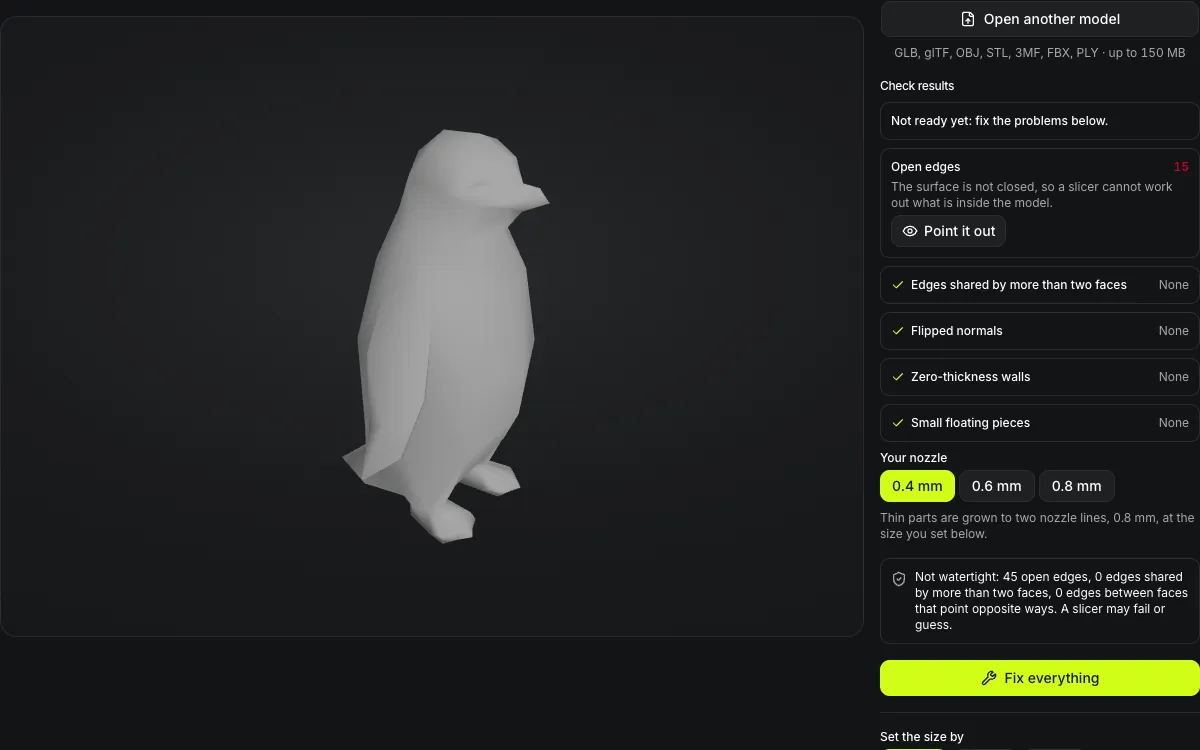
Low-poly penguin: 15 holes
45 open edges around 15 holes. Fix everything welded 848 vertices and filled all 15, and the panel went from Not ready yet to Ready to print: the penguin is a closed solid. Hollowed at 80 mm with 2 mm walls, it needs 68% less resin, with one drain hole drilled through the floor.

Treasure chest: seams only
Unwelded, the chest looked like 144 loose pieces; welding 4,704 seam vertices showed it was already a closed solid, so the check reports Ready to print and there is nothing to fix.


Toy robot: membranes
37 non-manifold edges came from 32 back-to-back face pairs; removing them left 0, the inside-out faces went with them, and the robot was verified watertight.
Two surfaces thinner than two nozzle lines at 100 mm were left, which the fix could not grow in place. Rebuild as one closed surface, offered under the result, sets every wall to the nozzle's minimum.
Hollow a model for resin printing
A solid resin print wastes resin and pulls hard on the build plate; a hollow one with drain holes does not.
1.5, 2 or 3 mm walls
The inside is carved out below the wall depth; on a 40 mm test cube the walls came out within 0.2 mm of the setting.
Drain holes that reach the cavity
One or two holes of 3.5, 4 or 5 mm go through the floor into the lowest part of the hollow, so uncured resin can drain.
Cut at the printed size
Hollowing runs after you set the size, so the wall is measured in millimetres on the print, not in file units.
Outside untouched
Only the inner surface is new; every outer triangle is kept, so detail on the print does not change.
Repair an STL for printing in four steps
From an open file to a closed, sized solid.
- 1
Open a GLB, glTF, OBJ, STL, 3MF, FBX or PLY, or one of your models from your Library; the check lists every fault it finds, or says the model is ready to print.
- 2
Press Point it out on a row and the camera flies to the first hole, tangle or thin part, drawn in color; Next steps through the rest.
- 3
A single pass repairs, thickens thin parts, and proves the result closed. Switch between Before and After to compare.
- 4
Set a height, width or depth in mm, cm or inches, then download STL, 3MF, OBJ or GLB, or continue with the repaired model to add a base, split it for printing, cut it or convert it.
Limits of STL repair in the browser
Patching keeps every detail, so it cannot fix what needs rebuilding.
Rebuild smooths fine detail
When patching cannot close a model, Rebuild remakes it from a voxel grid (about 0.3–0.8 mm at 100 mm): it closes tangled surfaces and gives open sheets thickness, but parts thinner than the grid disappear and detail below it is smoothed.
Flat patches
A hole is closed with a flat fan, which suits small and nearly flat holes; a patch on a curved area needs sanding or a remesh.
Thin-part check has a resolution
The scan runs on a grid of up to 4 million voxels, so on a large model it can only see parts thinner than two voxels; the row says the thickness it actually measured.
Shape only
STL and OBJ carry geometry only, so textures and colors are dropped from the repaired file; the GLB export is untextured too.
Never made worse
If a model is already a closed solid and patching would break that, it is left as it was.
After the STL repair
Where a repaired model usually goes next.
Too big for the bed
The free 3D model splitter cuts it into closed parts, with pegs or dowels to line them up.
Needs a stand
The 3D print base generator puts the repaired model on a base and joins them into one solid; the file is handed over in your browser.
Still not closed
3D remesh rebuilds the surface as one watertight mesh.
Questions about STL repair
Answers about holes, closed solids and what repair can and cannot do.
Check your model now
Open a model and download a closed, printable solid in your browser, free.