
AI 3D scene renderer
Stage your 3D models, frame the shot and turn it into a finished picture. The AI 3D scene renderer lets you place up to five models and frame the exact view; press Render and the frame goes to Nano Banana with a prompt built from your choices, which keeps the models and paints the scene around them. Staging is free; you pay only for the render.
The AI 3D scene renderer in numbers
GLB, glTF, FBX, OBJ, STL or PLY up to 250 MB each, moved, turned and scaled with a gizmo.
1:1, 4:3, 3:4, 16:9 or 9:16, seen from the front, three-quarter, side or top; the render starts from a 1,024-pixel capture.
Plus 3 levels of how closely to follow the stage, and 9 lights, 8 grounds and 5 effects under More settings.
Nano Banana 2 or Nano Banana Pro; the price shows on the Render button, and a render that fails is refunded.
Watch the scene renderer stage two models
This page recorded at about 1.25 times speed, with the first model's download shortened. Nothing is rendered or charged in it.

A knight, a chest and the look of the render
The chibi knight is staged from the empty stage and a treasure chest file is added beside it; every model arrives one unit tall. The frame switches to 16:9 and the three-quarter view fits both models into it. The look is then set to the Podium scene, the Movie still style, Golden hour light and a wood ground, and the panel shows the price, 10 credits. Model loading and the 16:9 redraw are sped up.
How it works
How the AI 3D scene renderer keeps your models
The image model starts from your staged view, not from a blank canvas.
You set the composition
Models, pose, camera angle and framing come from the 3D stage, so the render shows the shot you chose.
The prompt protects the subject
Every render prompt starts by telling the model to keep each object's shape, colors and pose, then adds your choices.
You choose how closely it follows
Exactly changes only the light and surroundings; Closely may add fitting scenery and props; Loosely keeps the models recognisable but may reframe the whole scene.
Your own photo as the scene
Choose My photo and add a picture; it goes with the frame as a second reference, and the subject is placed into it with matching perspective and light.
Choices that build the render prompt
Pick from lists instead of writing a prompt; the exact prompt it builds is under More settings before you render.
Style
Photorealistic, cinematic, product shot, architectural, stylized, anime/toon, fantasy or sci-fi.
Light
Studio, golden hour, blue hour, dramatic, bright, moody, daylight or neon, or Auto to let the model decide.
Scene and ground
A studio backdrop, podium, interior, outdoors, city street, sky or gradient, your own photo, or the backdrop you set; on a reflective floor, concrete, wood, marble, grass or water, or floating.
Effects
Haze, depth of field, reflections, dust particles and light rays, in any combination.
Render a 3D model into a scene in three steps
From a model file to a finished picture.
- 1
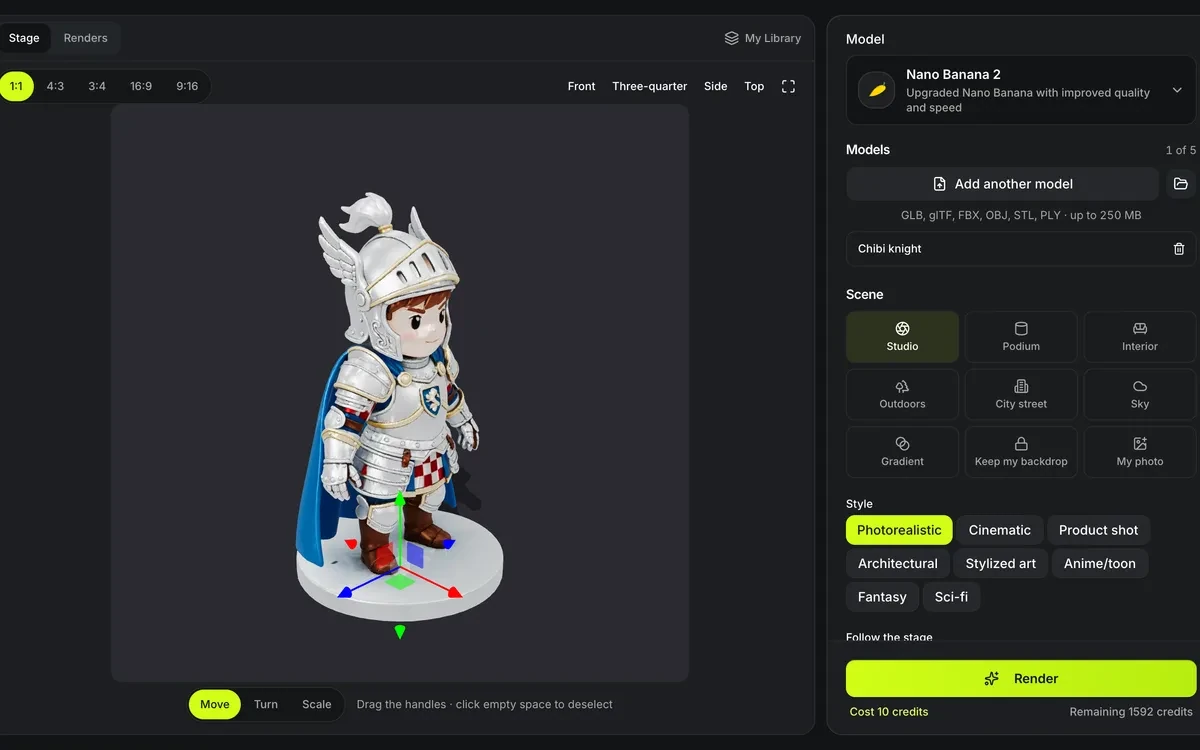
Open up to five models from your device or your Library, or start with a sample. Move, turn and scale each one, pick a frame, then choose a camera view or orbit to your own angle.
- 2
Pick a scene, a style and how closely the render follows the stage, and describe the scene in your own words if you like. Light, ground and effects wait under More settings.
- 3
Press Render, priced on the button. The render comes back beside the stage: slide between it and the staged frame, download it, or adjust the stage and render again.
Limits of the AI 3D scene renderer
An image model paints the scene, so some things are not guaranteed.
Small details may shift
Fine text, logos and thin parts can be redrawn slightly; following the stage Exactly changes the least.
A picture, not a 3D scene
The render is an image; the added scenery cannot be orbited or exported as 3D.
Five models at most
A scene holds up to five models; they are captured into one frame for the render.
Needs WebGL
Staging runs in a WebGL view; a browser with WebGL turned off cannot stage models.
Before and after the render
Where the models and the renders usually come from and go.
Questions about the AI 3D scene renderer
Answers about staging, prompts and what a render costs.
Stage your model now
Open a model, frame the shot and render it into a scene.