
Picture
PNG, JPEG, WebP · up to 10 MB · or drop it here
Use the prompts for
Style
Prompts
Pay extra attention to
Choose, drop or paste (Ctrl/Cmd+V) a picture first.
Credits come with a plan or a credit pack, from $12
Your prompts
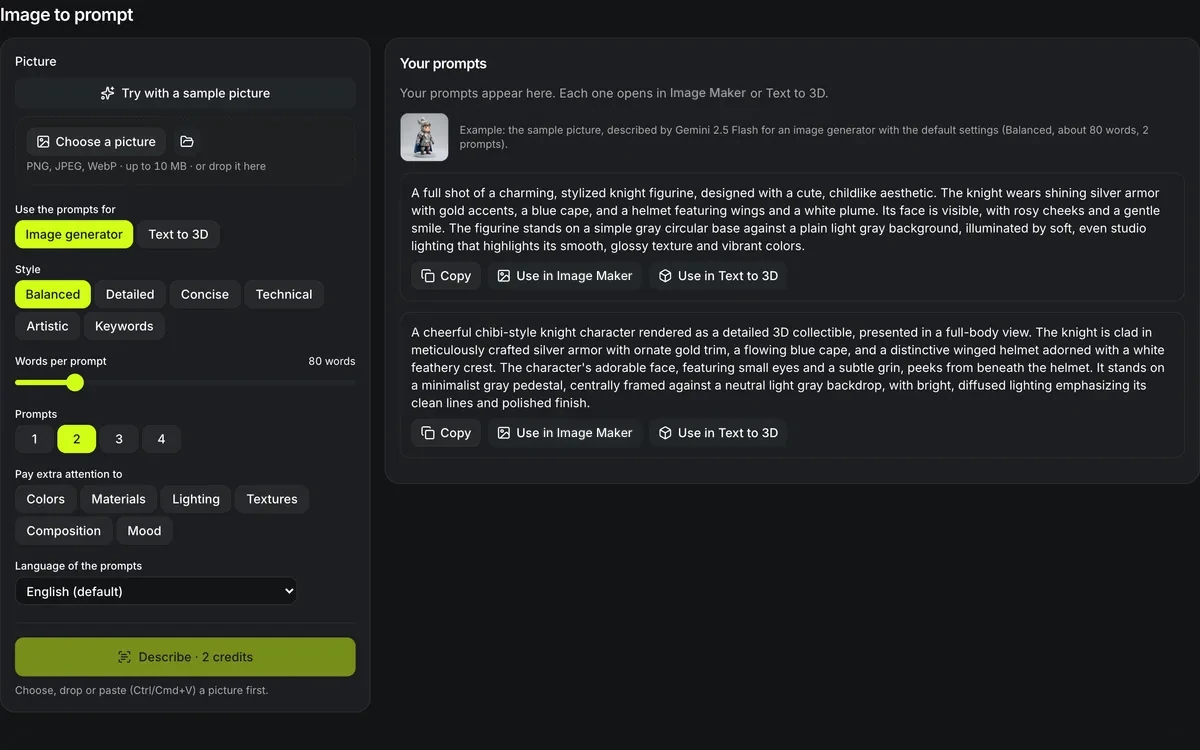
Your prompts appear here. Each one opens in Image Maker or Text to 3D.

Example: the sample picture, described by Gemini 2.5 Flash for an image generator with the default settings (Balanced, about 80 words, 2 prompts).
A full shot of a charming, stylized knight figurine, designed with a cute, childlike aesthetic. The knight wears shining silver armor with gold accents, a blue cape, and a helmet featuring wings and a white plume. Its face is visible, with rosy cheeks and a gentle smile. The figurine stands on a simple gray circular base against a plain light gray background, illuminated by soft, even studio lighting that highlights its smooth, glossy texture and vibrant colors.
A cheerful chibi-style knight character rendered as a detailed 3D collectible, presented in a full-body view. The knight is clad in meticulously crafted silver armor with ornate gold trim, a flowing blue cape, and a distinctive winged helmet adorned with a white feathery crest. The character's adorable face, featuring small eyes and a subtle grin, peeks from beneath the helmet. It stands on a minimalist gray pedestal, centrally framed against a neutral light gray backdrop, with bright, diffused lighting emphasizing its clean lines and polished finish.
Image to prompt
Turn a picture into prompts you can reuse. Image to prompt reads your picture with a vision model and writes 1 to 4 alternative prompts — for an image generator, or for Text to 3D, where the prompt keeps only the object's shape, parts and materials. Choose the style, length, focus and language, then open any prompt in Image Maker or Text to 3D with one tap.
One sample picture, two prompts, and what each one made
The knight that Try with a sample picture loads, described by Gemini 2.5 Flash at 2 credits a run: once for an image generator and once for Text to 3D. Each first prompt was then sent on with its Use in button and run once, with nothing edited: Nano Banana 2 drew the picture for 10 credits and Tripo H3.1 built the model for 26. The inset is the picture that was described; open a card to read the prompt.
How image to prompt reads a picture
A vision model looks at the picture and writes what a generator would need to see.

A prompt for a picture, or for a 3D model
Pick Image generator and the prompt covers subject, framing, light and palette; pick Text to 3D and it keeps one object's shape, parts and materials and drops the scene. Style, words per prompt, how many prompts, extra attention and language are all set before the run.
Words printed in a picture are described as part of the scene, never followed as instructions.

Four alternatives from one run
This run asked for 4 Text to 3D prompts of the sample knight at 80 words each and cost 2 credits, the same as asking for one. Each prompt is a complete description on its own, so you compare them instead of trusting a single caption.

One tap into Text to 3D
Use in Text to 3D opened Text to 3D with the first prompt already in the box, priced at 26 credits with Tripo H3.1 before anything ran. Use in Image Maker does the same for a picture: the prompt arrives filled in, priced at 10 credits with Nano Banana 2.
Image to prompt at a glance
Image to prompt in numbers
Alternatives from one picture, because many prompts can make the same image; pick the one that reads closest.
One Gemini 2.5 Flash vision call, whether you ask for 1 prompt or 4, or for 10 words or 450.
Balanced, detailed, concise, technical, artistic or keywords, written in English, Spanish, French, German, Japanese, Chinese and five more.
PNG, JPEG or WebP, uploaded to your private storage and read only by the vision call.
Image to prompt options
Four choices shape what the prompts say.
Style
Balanced sentences, an exhaustive list of details, one or two lines, technical camera and material terms, painterly language, or comma-separated keywords.
Length
From 10 to 450 words per prompt, in steps of 10.
Focus
Extra attention to colors, materials, lighting, textures, composition or mood.
Language
English by default, or one of ten other languages.
Get prompts from a picture in three steps
Upload, choose, describe.
- 1
A photo, render or drawing up to 10 MB, or the sample.
- 2
Image generator or Text to 3D, then style, length, focus and language.
- 3
Run it for 2 credits, then copy a prompt or open it in Image Maker or Text to 3D.
Limits of image to prompt
A description is an interpretation, not a recipe.
Not an exact copy
A generator given the prompt makes a new picture in the same spirit, not the original pixel for pixel.
No names of people
Real people are described by appearance, and living artists by the traits of their style, never by name.
Busy pictures blur
A crowded scene gets a general description; crop to the part you care about first.
Sign-in and credits
Each run needs an account and costs 2 credits; a failed run returns them.
After image to prompt
Where a described picture goes next.
Questions about image to prompt
Answers about targets, languages and cost.
Describe a picture now
Upload a picture and get up to 4 prompts for images or 3D, for 2 credits.