
AI 3D workflow builder
Pipelines turns the studio's tools into nodes on a canvas. Connect a photo to background removal, the cutout to Image to 3D and the model to a preview. Press Run once and our servers work through each step in order. The price shows before anything is charged.

What one pipeline can hold
In 7 groups: inputs, text, image, 3D, logic, previews and outputs, and notes.
19 image models in Generate, 13 in Image to 3D, 10 in Text to 3D and 8 in Multi-view to 3D, plus texture, retopology and image-tool models.
The most one pipeline holds. A single run starts up to 64 jobs, since Multi-view draws four pictures.
Photo to 3D model, prompt to image to 3D, a character turnaround and retopology, each readable before you sign in.
One batch runs a pipeline once per row of a file: 50 rows on Creator, 200 on Studio.
Write prompt expands a short idea into a full prompt for no credits, up to 10 times in one run.
How the AI 3D workflow builder runs a chain
A pipeline is built once and run as often as you like; each run is priced from the steps it will actually run.
Start from an example, a sentence or an empty pipeline
Open one of the four examples, type the job into Describe it and edit the draft it returns, or add nodes yourself with the space bar.
Wire outputs into inputs
A port only accepts what it can use: a picture output cannot land on a text input. Each model step keeps the model and settings its tool page offers.
Check the price, then run
The Run button shows the credits before you press it. A step that fails gives its credits back and the steps after it are skipped; a step with a fixed seed is reused on a rerun while nothing above it changes.
Collect, reuse and repeat
Name the file sets the file names, Bundle as ZIP packs them and File into a project files the run. App mode turns the pipeline into a short form, and Batch runs it for every row of a CSV file.
Nodes for each part of a 3D pipeline
Every node in the AI 3D workflow builder is one of the studio's own steps, priced the way its tool page prices it.
Inputs
Image, Text and 3D model hold what a run starts from: an upload, an item from My Library, or words.
Text
Prompt with blanks joins up to three texts into one prompt; Write prompt turns an idea into a full prompt. Text AI asks Gemini about a prompt and up to three pictures during the run, from 1 credit, and its text feeds the next step.
Image
Generate, Edit, Remove background, Upscale, Pose changer, Style transfer, Extract part and Multi-view, which draws front, left, back and right views.
3D
Image to 3D, Text to 3D, Multi-view to 3D, Texture for a new surface and Retopology for cleaner geometry.
Logic
Switch hands on one of three texts, pictures or models: the one you pick, or the first that holds something. Only the branch it uses runs and is charged. Seed gives several steps one seed, fixed to repeat a result or empty for a new one each run.
Previews and outputs
Preview shows a result on the canvas; Name the file, Bundle as ZIP and File into a project name, pack and file the finished files.
Example pipelines
Four pipelines to begin from
Open any of them to read its steps on a read-only canvas; signing in makes it your own copy.
Photo to 3D model
Image, Remove background, Image to 3D on Tripo H3.1, Preview: one picture in, one model out.
Prompt to image to 3D
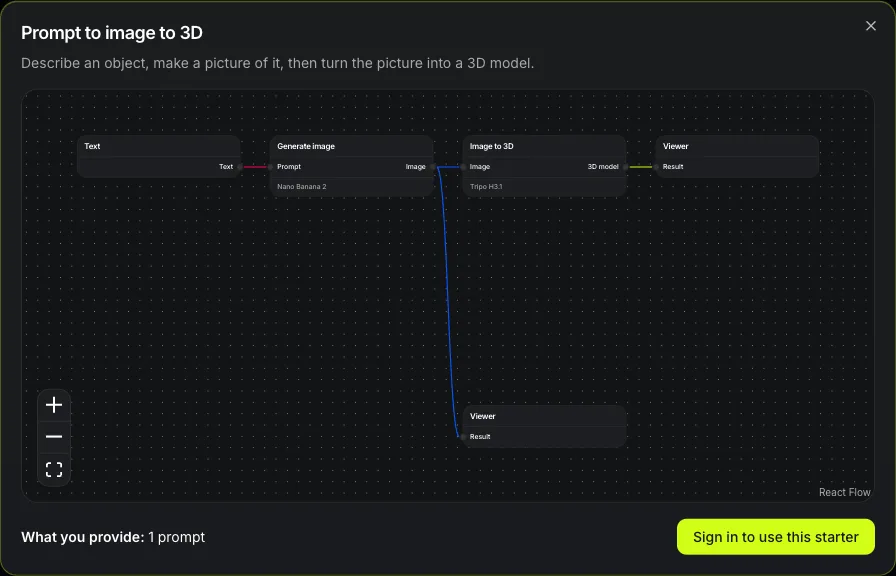
Text, Generate on Nano Banana 2, Image to 3D, with a preview on the picture and another on the model.
Character turnaround to 3D
Pose changer puts the character in an A-pose, Multi-view draws four views of it, and Multi-view to 3D builds the model from all four.
Retopology
A 3D model in, Retopology out: an existing mesh rebuilt with cleaner geometry.
What a pipeline cannot do
A pipeline chains the studio's steps; it is not a general scripting engine.
No loops, and no branching on a result
A Switch decides while the run is prepared, from what the inputs hold. Nothing can look at a finished model and pick the next step from it.
Only the studio's own steps
There are no custom nodes, scripts or checkpoints to load; a step exists only if the studio offers it on a tool page.
Each model step is paid
Text steps, logic and outputs cost nothing, but every model step costs its tool page's credits. Batch is not part of the Free and Starter plans.
A 3D model input cannot be batched
A CSV row carries text and picture names, so a pipeline that starts from a 3D model runs one model at a time.
Questions about the AI 3D workflow builder
Short answers about cost, models and reuse.
Build your first pipeline
Open an example, put your own picture in it, and see the price before the first run.