

Sample
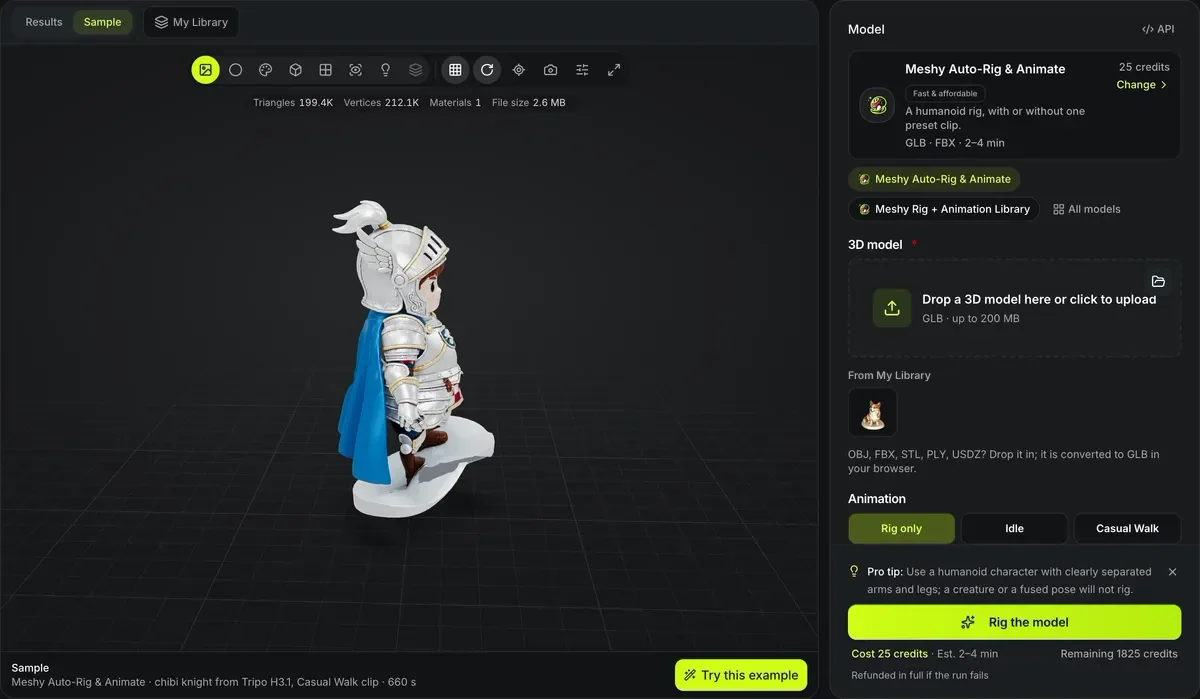
Meshy Auto-Rig & Animate · chibi knight from Tripo H3.1, Casual Walk clip · 660 s
3D model auto-rigging
Add a skeleton and skin weights to a character or creature. 3D model auto-rigging here runs Meshy rigging for humanoids, with one preset animation or up to 10 clips from Meshy's 656-clip library, and Tripo Auto-Rig for quadrupeds, birds, snakes, fish and multi-legged creatures.
The auto-rigged knight playing its walk cycle
A render of the GLB that Meshy Auto-Rig returned, looped twice. Nothing was keyed by hand.

Casual Walk on a Tripo H3.1 knight
Meshy Auto-Rig bound a humanoid skeleton to the knight and baked in the Casual Walk preset, a 4.2-second cycle. The whole run took 660 seconds and cost 40 credits: 25 for the rig, 15 for the animation.
A static mesh, then the same knight walking
Both files are real runs. The first is the mesh as generated; the second is that exact mesh after Meshy Auto-Rig with the Casual Walk animation. Open each card to orbit it; the rigged one plays its walk cycle in the viewer.

Before: one static mesh
Tripo H3.1Generated from concept art. No bones, no skin weights, no animation: an engine can place it but cannot move it.

After: rigged, with Casual Walk
Meshy Auto-RigThe same knight with a humanoid skeleton bound to the surface and one preset animation baked in, for 40 credits.
Rigging explained
How auto-rigging works
The tool finds the limbs of a mesh, builds a skeleton inside it, and binds the surface to the bones.
Humanoids and creatures
Meshy rigs humanoids and can add one preset animation or up to ten clips from its library; Tripo Auto-Rig covers quadrupeds, hexapods, octopods, birds, snakes and fish.
Inputs and outputs
Meshy takes GLB and returns GLB and FBX, and with the library engine one GLB and one FBX per clip; Tripo takes GLB, FBX, OBJ or STL and returns GLB.
Animation clips
Pick one of 9 presets to see the rig move straight away, or search 656 library clips and pick up to 10; or choose rig only.
Pose the character before you rig it
The rigger places joints by reading the gaps between limbs, so the pose of the source mesh decides how cleanly it bends.

Limbs clear of the body
An A-pose or T-pose leaves space under each arm and between the legs, so every limb gets its own bones and weights. Rodin Gen-2.5 and Meshy 7.1 can generate a character in either pose.

Arms at the sides rig poorly
Limbs touching the body can bind together; use A-pose or T-pose. Regenerate in A-pose rather than rigging a closed pose.
What 3D model auto-rigging costs and returns
Meshy rig only: humanoid skeleton and skin weights.
Rig plus one clip, a preset or a library clip (15 credits extra); every further library clip adds 15, so ten clips cost 175.
A GLB and an FBX back from every Meshy rig, and with library clips one GLB and one FBX per clip.
Meshy's animation library, searchable by name and grouped as walk and run, daily actions, fighting, body movements and dancing; up to 10 clips per run.
Rig a character
A-pose or T-pose characters rig most cleanly.
- 1
Rodin Gen-2.5 and Meshy 7.1 can generate characters in T-pose or A-pose.
- 2
Pick the height that matches the character so the skeleton scales correctly.
- 3
Each animation adds 15 credits; the library engine takes 1 to 10 clips.
- 4
Download FBX for Unity, Unreal or Blender.
Auto-rigging limits
Rigging depends on the input pose and shape.
Meshy needs GLB input
Convert OBJ, FBX or STL to GLB first for Meshy (the free 3D file converter reads them in the browser); Tripo Auto-Rig reads them directly.
Loose clothing may stretch
Capes and long skirts follow the nearest bone and can deform oddly.
A display base is rigged too
A base or pedestal under the character is skinned with the legs and bends with them in every clip. Cut it off first with the free 3D model splitter, or start from a picture without one.
Library clips fit humanoids only
Meshy's clips ride on its humanoid rig, so a Tripo creature rig has no library clip and needs its own animation.
One file per clip
The library engine returns every clip as its own GLB and FBX beside the rigged character, and the viewer plays one at a time. For one file holding several clips, use the free animation library.
Auto-rigging FAQ
Answers about automatic rigging.
Make your character move
Pick a GLB character, choose a height and the clips you want, and rig it for 25 to 175 credits.